If a close friend asked for it, this is the GST registration guide I would give to them
Indian IT Freelancers and Full Time contractors need to register for GST once their revenue crosses 20LPA
Tl;dr
- Default option: If you opt into Simplified GST Registration (Rule 14A) in REG-01 and Aadhaar authentication is completed, the system auto-approves eligible low-risk cases in 3 working days.
- If the case is flagged (or Rule 14A is not used), the officer has 7 working days to approve the registration or issue a query in normal cases. (Unusual)
- If Aadhaar authentication is not completed, or the case goes for physical verification, the time limit becomes 30 days. (Unusual)
- If there is an objection, the officer issues REG-03.
- You must reply in REG-04 within 7 working days.
- After your reply, the officer gets 7 working days to approve. If the officer does not act within time, the application becomes deemed approved under the rules.
- GSTIN generation does not close the matter. Officers can start post-registration verification and cancellation proceedings if the place of business is wrong or documents are not valid.
This post explains how to apply for GST registration yourself. It is based on real filings.
When GST registration is compulsory
If your turnover crosses the GST limit, registration is compulsory.
- The threshold is ₹20 lakh for services in normal States.
- The threshold is ₹10 lakh for services in special category States.
Pre-requisites for this recipe
Keep these ready before you start:
- Your photograph (JPEG/JPG only)
- Your Aadhaar card
- Your PAN card
- Your email ID
- Phone number linked with Aadhaar
- Electricity bill of selected registered office (first page only)
- Coordinates of the selected GST registered office (you need to have one)
- Coordinates of address on Aadhaar (if different)
- Consent letter / NOC/Rent Agreement for registered office (if not owned by you)
- Aadhaar or PAN card of the owner of registered office (if not owned by you)
- Property tax receipt (if available)
- Bank proof (cancelled cheque or first page of bank statement)
File size: Portal allows higher limits now (upto 5 mb/file). Keep files clear and readable. Do not upload blurred files.
Quick Note 1: You must be able to check your email ID and phone for OTPs. OTPs come at the start and at the end of the process
Quick note 2: The legal name will always be the name as per PAN. Trade name is optional.
Place of business rule
You must declare a principal place of business. Also, prove that you are allowed to use that address.
Pick the correct "nature of possession":
- Owned
- Rented/Leased
- Consent
If your rent agreement restricts use to "residential purpose only", it does not support business use as principal place of business. You need a consent letter/NOC from the owner or use an agreement that allows business use.
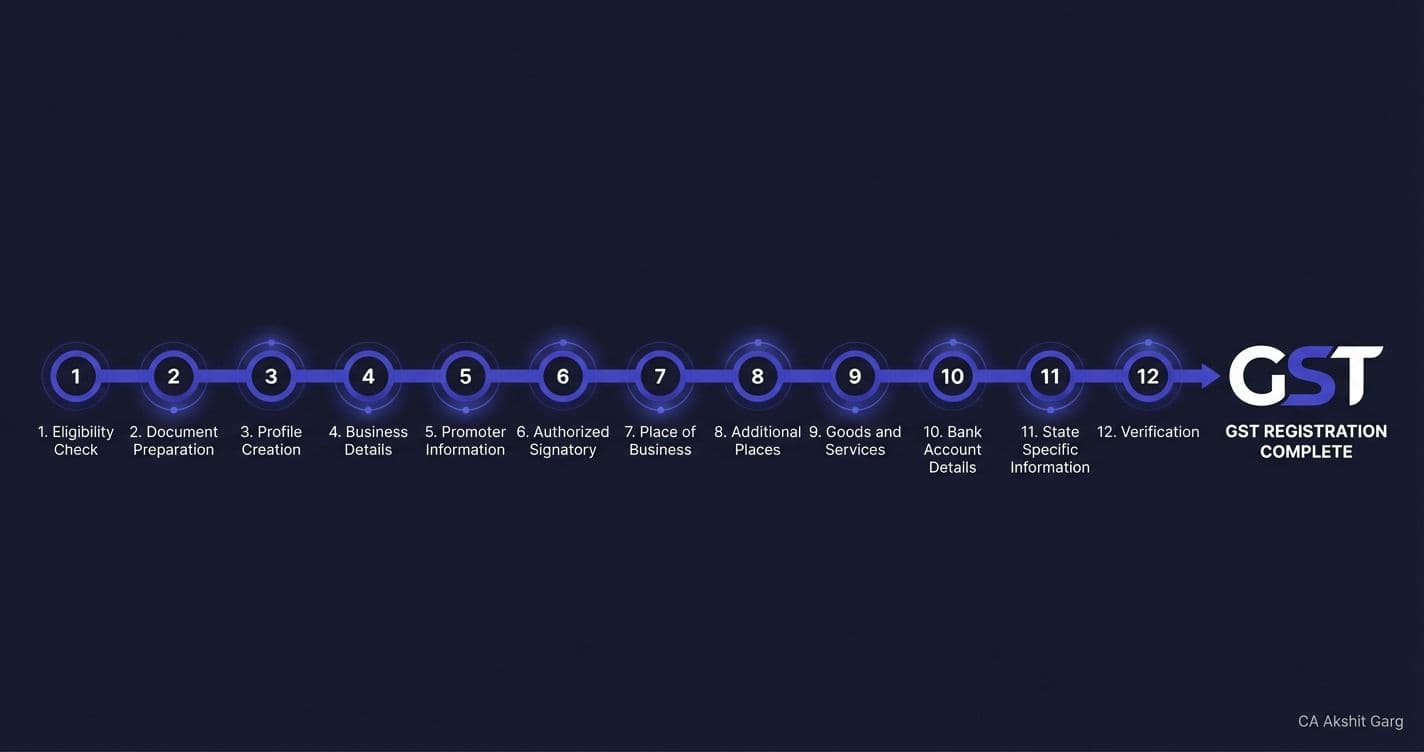
Step by step GST registration process (with photo points)
Go to: [https://reg.gst.gov.in/registration/](https://reg.gst.gov.in/registration/)
Step 1
For registration type choose Taxpayer.
Step 2
Fill details:
- State
- District
- Legal name as per PAN
- PAN
- Mobile number linked to Aadhaar
Click Proceed.
{width="4.864583333333333in" height="3.09375in"}
Step 3
- Enter OTPs.
- After OTP submission, TRN will be generated.
- Note down the TRN.
Step 4
- Go back to the registration page.
- Choose the TRN option.
- Enter TRN + captcha → Submit → Submit OTP.
{width="6.5in" height="3.0555555555555554in"}
Step 5
Click the edit icon. Fill details in Part-B.
When it takes you to residential address page:
- Enter the aadhar address location coordinates in the search bar.
- Select the correct location.
- Fill the address fields below.
- Choose Also Authorised Signatory.
Click next.
{width="6.5in" height="3.5in"}
Step 6
Click Primary Authorised Signatory on the next page. Click next.
Step 7
Enter the location coordinates for the business address. Fill in the business address to match the documents.
Select:
- State jurisdiction
- Centre jurisdiction
{width="6.5in" height="3.7777777777777777in"}
Step 8
Select nature of possession:
- Owned
- Rented/Leased
- Consent
Upload the correct documents.
{width="6.5in" height="3.763888888888889in"}
Important point about rent agreements: If the rent agreement says "residential use only", the officer raises an objection. Use a consent letter instead.
Step 9
Fill remaining details → Add your service details.
For remote IT workers, enter 998314. It covers:
- Software development
- IT consulting
- Computer programming
{width="6.5in" height="2.6805555555555554in"}
Step 10
- Submit application.
- Opt for Aadhaar authentication.
- Enter OTP.
- After submission, ARN is generated.
Step 11
Aadhaar authentication link comes. Complete Aadhaar authentication.
If your case is flagged, you must visit facilitation centre for:
- Biometric Aadhaar authentication
- Photograph
- Original document verification
Application is treated as submitted after Aadhaar authentication is completed.
Step 12
- Once the GST registration is approved, goto: Services\>Registration\> Amendment of Registration Non-Core Fields and add bank details.
- Upload cancelled cheque or bank proof.
What happens after submission
Case 1: No objection
- GSTIN is generated.
- Officer must approve within 7 working days.
Case 2: Officer issues notice (REG-03)
- You will receive a notice.
- Login using TRN.
Go to: Services → Registration → Application for Filing Clarification
- Enter notice number. (Available in user services\> view notices and orders)
Choose option: Open fields with queries raised through GST REG-03. This saves time.
- Upload documents and reply point by point.
- Submit within 7 working days.
Officer must approve or reject within 7 working days after your reply.
Common reasons for rejection
- Address mismatch across documents
- Blur electricity bill
- Consent letter missing
- Owner ID proof missing
- Wrong nature of possession selected
- Business address pin mismatch
- Applicant not available for verification
GST registration is fast now but GSTIN generation does not mean the case is closed.
Officers issue notices later if:
- Place of business is not valid
- Documents are not valid
- Business is not found at the address
Keep your documents clean. Use correct address. Pretty obvious but, do not use fake rent agreements or fake NOCs.